
Skip to content
ClicCash
More
Get the app

Legal

Terms and conditions — Individuals

Version 1.0 • Effective Date: December 9, 2025 • Jurisdiction: Antigua and Barbuda

1. Introduction and Agreement

Welcome to ClicCash. These Terms and Conditions ("Terms") constitute a legally binding agreement between You ("User", "Consumer") and ClicCash Limited, a company incorporated under the laws of Antigua and Barbuda ("ClicCash", "we", "us", "our").

ClicCash Limited is a subsidiary of ClicCash Technologies Canada Ltd. and is registered with the Office of National Drug and Money Laundering Control Policy (ONDCP) as a Money Service Business (Registration Number: PSP-0001).

IMPORTANT:

By clicking "I Agree" or by registering for, accessing, or using the ClicCash mobile application ("App") or services, you acknowledge that you have read, understood, and agreed to be bound by these Terms and our Privacy Policy. If you do not agree, you must not access or use the Service.

2. Definitions and Interpretation

In these Terms, the following definitions apply:

  • "Account": The digital profile held by you with ClicCash which records your balance and transaction history.
  • "App": The ClicCash mobile application published by ClicCash Technologies Canada Ltd. and operated by ClicCash Limited.
  • "Biometric Credentials": Characteristics used for authentication, including but not limited to fingerprint and facial recognition (e.g., FaceID).
  • "Digital Value": The electronic representation of money recorded in your Account.
  • "Force Majeure": Events beyond our reasonable control, including natural disasters, telecommunications failure, or government action.
  • "Merchant": A commercial entity authorized to accept payments via ClicCash.
  • "PIN": Your Personal Identification Number used to authorize transactions.
  • "Service": All services provided by ClicCash, including P2P transfers, merchant payments, bill payments, and cash-in/cash-out services.

3. Account Registration and KYC Tiers

3.1 Eligibility

To use ClicCash, you must be at least 16 years old and a resident of Antigua and Barbuda. You must have a valid mobile phone number and a compatible mobile device.

3.2 Verification and KYC Requirements

ClicCash operates in strict compliance with the Money Laundering (Prevention) Act, 1996. To open any Account with ClicCash, regardless of the tier, you are required to provide:

  • At least one (1) valid Government-issued Identification (e.g., Passport, Driver's License, Voter's ID, Social Security Card).
  • Proof of Address (e.g., Driver's License, Voter's ID, Utility bill, bank statement).

3.3 Tiered Structure and Changes

We operate a tiered account structure based on risk profiles and usage needs.

  • Account Tiers: Your Account may be assigned a specific "Tier" which determines your daily and monthly transaction limits and maximum balance.
  • Right to Modify: ClicCash reserves the right to create, remove, or modify Account tiers, transaction limits, and the required documentation for any tier at our sole discretion and without prior notice.
  • Additional Information: From time to time, we may require you to provide additional identifying information or documentation to satisfy our regulatory obligations or internal compliance reviews. Failure to provide such information may result in the suspension or termination of your Account.

3.4 Accuracy of Information

You warrant that all information provided is accurate and current. Providing false information regarding your identity is a criminal offense.

4. The Service and Funds Protection

4.1 Nature of Services

ClicCash allows you to send, receive, and store electronic representations of money.

Important Notice:

ClicCash is not a bank, and your Account is not a bank account. The Digital Value stored in your Account represents a claim against ClicCash. No interest will be paid on any balance held in your Account.

4.2 Segregated Funds (Safeguarding)

Your peace of mind is paramount. All user funds are held in a segregated custodial account at a licensed commercial bank in Antigua and Barbuda. These funds are separate from ClicCash's corporate operating funds and are protected for your benefit.

4.3 Transaction Finality and Reversals

Once a payment order is successfully initiated and confirmed by our system, it is considered final. We cannot reverse a completed transaction unless:

  • The recipient explicitly consents to the reversal;
  • There is a proven technical system error; or
  • We are directed to do so by relevant regulatory or law enforcement authorities.

5. Fees, Charges, and Taxes

5.1 Dynamic Fee Disclosure (Important)

We believe in total transparency.

  • Applicable fees (transaction fees, withdrawal fees, etc.) will be clearly displayed to you dynamically on the transaction confirmation screen within the App before you authorize the payment.
  • By entering your PIN or using Biometric authentication to proceed, you acknowledge and accept the specific fee displayed.

5.2 Taxes

You are responsible for any applicable government taxes, levies, or duties related to your transactions. Where required by law, ClicCash will deduct such amounts automatically from your transaction.

6. Security, Authentication, and Liability

6.1 Electronic Signature

You agree that the use of your PIN or Biometric Credentials constitutes a Secure Electronic Signature under the Electronic Transactions Act, 2006. This creates a binding legal obligation on you for all resulting transactions.

6.2 Security of Credentials

You are solely responsible for keeping your PIN, device, and Account secure. You must not share your PIN with anyone.

6.3 Liability for Unauthorized Transactions

  • Your Responsibility: Generally, you are liable for all transactions performed using your credentials. Do not respond to text messages, pop-ups, emails or other Internet requests that ask you to reveal personal information about yourself or your account with us.
  • Notification Shift: If you believe your PIN or device has been compromised, misused, stolen or lost you must notify ClicCash Support immediately.
  • Liability Limit: You will not be liable for unauthorized transactions that occur after we have received your notification and have had a reasonable opportunity to freeze your Account. You remain fully liable for all transactions that occurred prior to your notification. We will never send you unsolicited text messages or emails asking for your PIN or account number.

7. Data Protection and Privacy

7.1 Data Processing

We process your personal data in accordance with the Data Protection Act 2013 and our Privacy Policy. We collect data primarily to provide the Service and comply with AML/CFT regulations.

7.2 Biometric Consent

By enabling "FaceID" or "TouchID" login features, you explicitly consent to the processing of your biometric data for the specific purpose of secure authentication. You may withdraw this consent at any time by disabling the feature in your device settings.

7.3 Data Sharing

We do not sell your data to third-party advertisers. We only share data with:

  • Regulatory bodies (e.g., ONDCP, ECCB) as required by law.
  • Identity verification and fraud prevention partners (third-party vendors we utilize to verify your identity and monitor transaction security).
  • Third-party service providers essential to the delivery of the Service.

7.4 Privacy

You acknowledge and accept that: We will partially mask your account numbers, but balance and other information about your bank account(s) may be included and stored on your mobile device. You acknowledge and agree that we will not be liable to you for any loss that you may suffer including if your mobile device is lost or stolen. Anyone with access to your mobile device could view its content unless you lock your device. You are responsible for keeping this information confidential and secure.

8. Prohibited Activities

You agree not to use ClicCash for:

  • Money laundering, terrorist financing, or any illegal activity.
  • Purchase of illegal goods or services (e.g., illegal drugs, unlicensed gambling).
  • Transactions that violate the Money Laundering (Prevention) Act, 1996.

We reserve the right to suspend or terminate your Account immediately if we suspect any prohibited activity.

9. Dispute Resolution and Complaints

9.1 Internal Resolution

If you have a complaint, please contact ClicCash Support at support@cliccash.com. We are committed to acknowledging and resolving your complaint within seven (7) days of receipt.

9.2 Right to Escalate (ECCB)

If we are unable to resolve your complaint within 7 days, or if you are dissatisfied with our resolution, you may escalate the matter to the Eastern Caribbean Central Bank (ECCB).

10. Suspension or Termination

10.1 Suspension by Us

We may suspend your account if we believe you are in breach of these Terms or any other agreement you have entered with us. If we suspend your account, we will notify you.

10.2 Termination by You

You may close your Account at any time by contacting Support, provided there are no pending transactions or disputes.

10.3 Termination by Us

  • For Convenience: We may terminate this Agreement and close your Account by providing you with at least 30 days' written notice.
  • For Cause: We may terminate this Agreement immediately and without notice if you breach these Terms, engage in fraud, or violate any applicable law.

10.4 Unclaimed Funds

If your Account remains inactive for a statutory period, we may be required to transfer your balance to the relevant authorities as abandoned property.

11. General Provisions

  • Governing Law: These Terms are governed by the laws of Antigua and Barbuda. The courts of Antigua and Barbuda shall have exclusive jurisdiction.
  • Changes to Terms: We may amend or replace these Terms at any time. We will provide you with written notice of any material changes, particularly regarding fees or liability. The new or revised Terms are effective and binding on you when we notify you of such change. If you continue to use our services after we post the notice that means you agree to accept the new or revised Terms as amended.
  • Severability: If any provision of these Terms is found to be unenforceable, the remaining provisions shall remain in full force and effect.
  • Future Interoperability: ClicCash may introduce interoperability with other digital asset classes, including Central Bank Digital Currencies (CBDCs) and stablecoins. Use of such features may be subject to additional terms.

Contact Us

If you have questions about these Terms and Conditions, please contact us:

ClicCash Support

Mailing Address

ClicCash Limited
Unit #16, Royal Palm Place, Friar's Hill Road
St. John's, Antigua & Barbuda

By clicking "I Agree", you confirm that you have read, understood, and accept these Terms and Conditions.
Put your money in your phone.

FREE TO OPEN / NO BANK ACCOUNT / NO CARD

Get the app
Skip to content
ClicCash
More
Get the app

Live in Antigua and Barbuda

Your money.
In your
phone.

ClicCash is Antigua's money app. It turns your phone into your wallet, so you can pay, get paid, and save without a bank account, a card, or cash in your pocket.

FREE TO OPEN / SIGN UP IN MINUTES / NO MONTHLY FEE

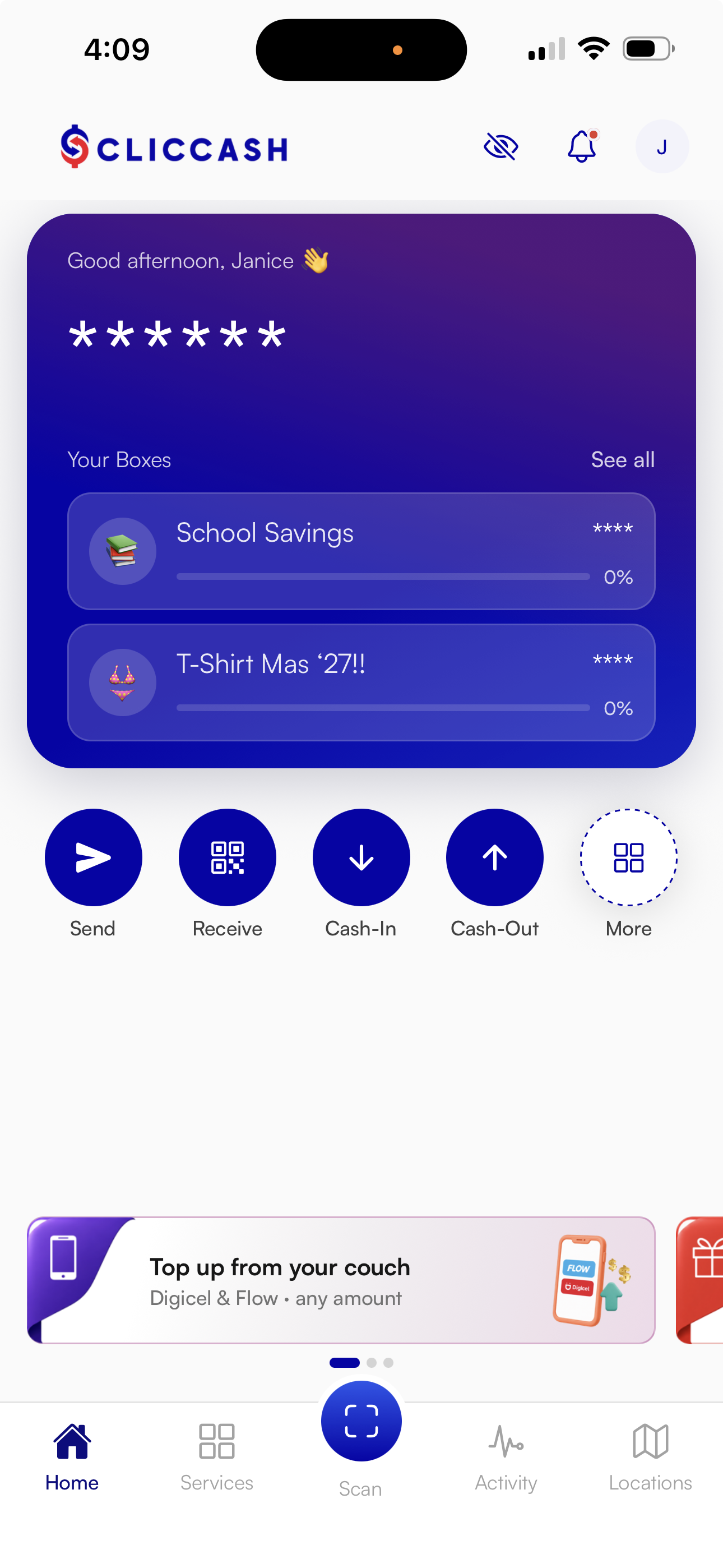
ClicCash app home screen showing account balance and boxes

PSP-0001

FIRST REGISTERED PAYMENT
SERVICE PROVIDER

1,000+

PEOPLE USING
CLICCASH TODAY

50+

BUSINESSES TAKING
CLICCASH TODAY

{{ machineCount }}

RPTs FOR CASH IN AND
CASH OUT, AND GROWING

01 / Getting started

Three steps and you are paying.

01

Open your account

Your phone number and an ID. Minutes in the app, not weeks at a bank. Free, and no paperwork to bring in.

02

Put your money in

Feed your notes into a ClicCash RPT, or transfer in from your bank using the reference code the app gives you. Free every time.

03

Pay and go

Scan the shop's QR code at the counter. Or pay from home — pick a contact, type a phone number, or choose a merchant in the app.

02 / In the app

Everything you do with cash, now in your phone.

Send money

To anybody on ClicCash — pick a contact or type a phone number. EC$1 flat, whatever the amount.

Top up your phone

Digicel or Flow, straight away, from inside the app. No fee to you.

Save in a box hand

ClicBox keeps the box hand honest. Every payment is written down, so everybody can see who paid.

Pay a shop

Scan the QR code at the counter, or choose the merchant in the app. No cash to count, no change to wait for.

Pay your bills

In the app, or at any ClicCash RPT.

Cash in and cash out

{{ machineCount }} ClicCash RPTs across Antigua, and growing. No card, no PIN.

03 / RPTs

Cash still works. It lives in your phone now.

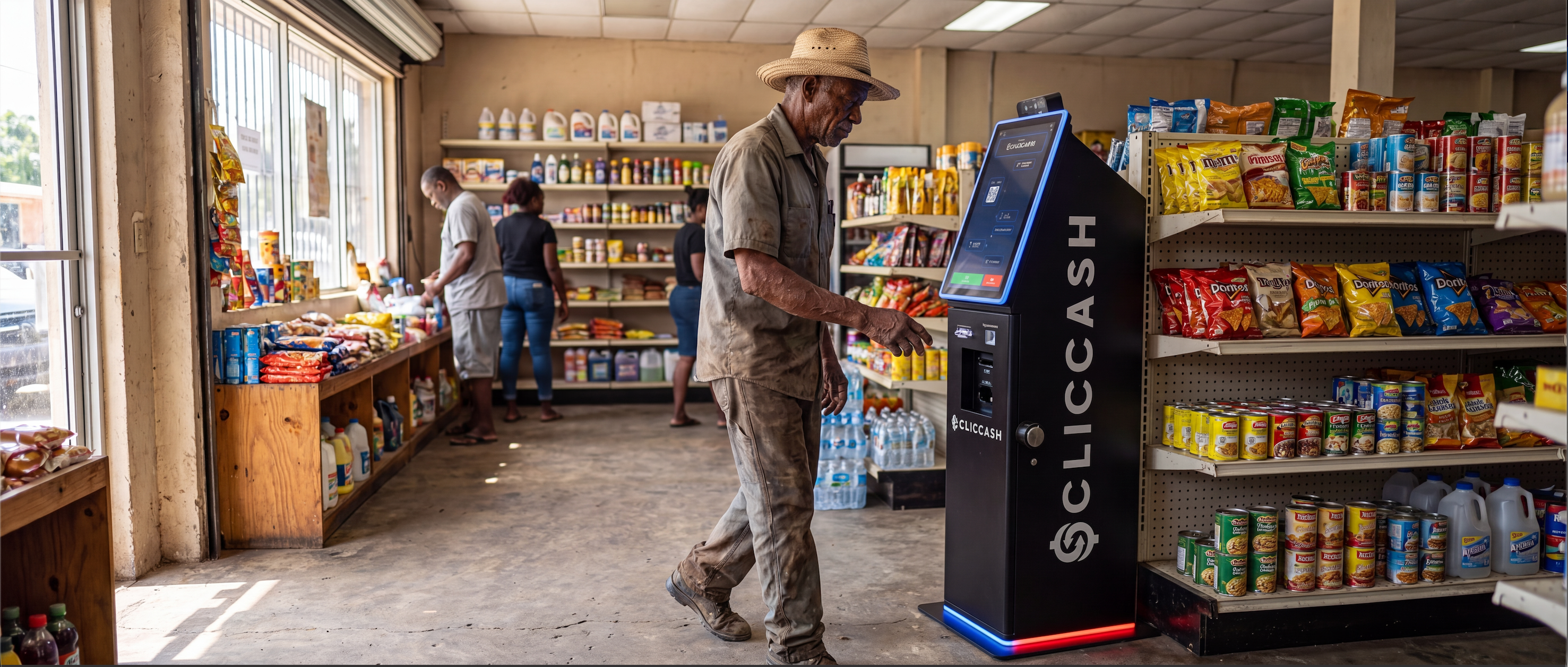
A ClicCash RPT — Remote Payment Terminal — is not an ATM. There is no card and no PIN, you use your phone and a QR code. Putting your cash in is free.

Find an RPT
A man cashing in at a ClicCash RPT inside a shop

04 / ClicBox

Box hand, without the risk.

Your group agrees the amount and the dates. The app keeps the record, so everybody can see who paid. Everybody is paid at the end of the cycle, on the same date.

How ClicBox works

05 / Business

Take the sale on the phone you already own.

No terminal to buy or rent. Free to join, no monthly fee, and payroll to your staff costs nothing. Merchant pricing is on the business page.

See how it works

06 / What it costs

FREE

to open your account, to hold it, and to put your cash in at an RPT. No minimum balance, no monthly fee.

EC$1

to send money to another person. Flat. Whether you send EC$5 or EC$5,000.

CASH-OUT AND BANK TRANSFER FEES ARE ON THE FEE SCHEDULE / RUN A BUSINESS? SEE THE BUSINESS PAGE

Every fee, in full

07 / Places you can pay today

WIOC Friars Hill Service Station, Mount Joy Service Station, Island Provision, Gourmet Basket Supermarket, Covent Gardens Supermarket, Townhouse Megastore, Serge Mart, Enzo’s Restaurant, Scottie’s Jerk Centre, Dr. Sengupta & Associates, Gomez Insurance, TicketPulse, Digicel Top-Up and Flow Top-Up.

"{{ t.quote }}"

{{ t.byline }}

08 / Questions

Do I need a bank account?

No. You need a phone number and an ID. You do not need a bank account and you do not need a card.

How do I get my money into the app?

Three ways. Put cash in at a ClicCash RPT, free. Transfer in from your bank, using the reference code the app gives you, also free. Or have your employer pay your wage or salary straight onto ClicCash.

What does it cost me?

Nothing to open or hold. EC$1 to send money to a person. EC$2 to take cash out. EC$10 to send to a bank account. Putting money in is free.

Who is ClicCash?

ClicCash Limited, a registered Payment Service Provider (PSP-0001) registered with the ONDCP. The first one in Antigua and Barbuda.

Where does it work?

Antigua and Barbuda, for now.

For business

Take the sale. Keep more of it.

Your customer scans a QR code on the phone you already own. No terminal to buy. No terminal to rent. 2.25% flat.

FREE TO JOIN / NO MONTHLY FEE / NO SETUP FEE

01 / What you get

Get paid by scan

The customer scans your QR code. The money lands in your ClicCash account.

Let your staff take payments

Add your staff as cashiers. Each one takes payments on their own phone, into your business account.

See every sale

The web portal shows transactions as they happen, plus cashier and staff records.

Pay your staff free

Payroll to staff with a ClicCash account is instant and costs nothing.

Stop counting cash

Less cash in the drawer at closing time, and a record of every sale.

FREE

to sign up, and free every month after. No setup fee, no monthly fee. A month with no sales costs you nothing.

2.25%

flat, on payments your customers make to you. You only pay when you get paid. That is the whole price list.

Onboarding

Free

Monthly fee

Free

Card terminal

Not needed

Payroll

Free

02 / Getting set up

01

Fill in the onboarding form online. It is free.

02

We check your business details and set up your account.

03

Put your QR code on the counter and start taking payments.

Start onboarding

Fees

What it costs. All of it.

Every fee we charge, in plain English. The signed legal version is the fee schedule, linked at the bottom of this page.

01 / Your account

Personal fees

FREE

to open your account, to hold it, and to put cash in at an RPT. No minimum balance.

EC$1

to send money to another person. Flat, any amount.

EC$2

to take cash out at a ClicCash RPT.

EC$10

to send money to a bank account.

$0

to top up a phone with Digicel or Flow. No fee to you.

02 / Your business

Business fees

2.25%

flat, on payments your customers make to you. Onboarding free, no monthly fee, no terminal, payroll free.

Sign up your business

03 / ClicBox

ClicBox fees

Operational fee when the cycle finishes

5%

Leaving a box before the cycle ends

0–10%

What you pay to leave early depends on how far through the cycle the box is.

Read the legal fee schedule

ClicBox

Box hand, kept straight.

Box hand, susu, partner hand — the same idea, run in the app. Nobody has to hold everybody's cash, and nobody has to remember who paid.

Start a box in the app
Five women looking at the ClicCash app together on a phone

Read this part

ClicBox does not go round in turns.

Nobody draws a hand in week one. Every member is paid at the end of the cycle, on the same date. Start a ClicBox on your own and save solo, or start one with a group — private or public. Would rather join one already running? Look for a public box and jump in.

01 / The rules

01

You agree the amount and the dates

The group sets how much each person pays and how often. A cycle can be as short as two periods.

02

Everybody is paid at the end

One payout date for the whole group, when the cycle finishes.

03

Everybody sees every payment

Each contribution is recorded in the app and visible to every member.

04

Miss too many and you are out

A member can miss up to 25% of the periods. After that they are removed from the box.

05

Open or private, decided at the start

Whether other people can see the box is set when it is created, and cannot be changed after.

06

What it costs

A 5% operational fee at the end of the cycle. Leaving early costs between 0% and 10%.

Approved box coordinators earn a commission, paid automatically. Ask us in the app if you want to be approved.

ClicCash RPTs

Where to put cash in and take cash out.

There are {{ machineCount }} ClicCash RPTs — Remote Payment Terminals — in Antigua. An RPT is not an ATM. There is no card and no PIN, you use your phone and a QR code.

Cash in

Free

Cash out

EC$2

All RPTs

{{ machineCount }} LIVE
{{ slot.label }}
MAP & LOCATIONS
COMING SOON

01 / Using an RPT

01

Open the ClicCash app on your phone.

02

Scan the QR code on the RPT.

03

Feed your notes in, or take your cash out.

Your money / licensing

How we hold your money.

Plain answers about your balance and what our registration means.

01 / The facts

Every dollar in your account is backed one to one

Your balance is held in local commercial banks. For every dollar showing in your account, there is a dollar in a local bank.

What PSP-0001 means

ClicCash Limited is a registered Payment Service Provider, registration number PSP-0001, registered with the ONDCP. It is the first Payment Service Provider registered in Antigua and Barbuda.

There is no card to lose

ClicCash works by scanning a QR code with your phone. There is no card and no PIN at an RPT. Your account is opened using your phone number and your ID.

If your phone is lost or stolen

Call us on +1-268-464-9700 and we will help you get back into your account.

Where ClicCash works

Antigua and Barbuda, for now.

{{ deviceLine }}

Get
ClicCash.

Free to download. Free to open. You need a phone number and an ID.

01

Put in your phone number.

02

Show an ID.

03

Walk to a ClicCash RPT and put your cash in, for free.

Send money

One dollar. Any amount.

Send to anybody in Antigua and Barbuda who has ClicCash. EC$1 flat, whether you send EC$5 or EC$5,000.

EC$1

to another ClicCash account.

EC$10

to a bank account.

FREE

to pay a shop. Scan their QR code, nothing extra to pay.

Get the app

Top up

Credit on your phone in seconds.

Digicel and Flow. The credit goes on straight away. No fee to you, and no line to stand in.

01 / Three ways

In the app

Pick the network, put in the number and the amount, confirm.

At an RPT

Every ClicCash RPT does top-ups and bill payments too.

For somebody else

Top up any Digicel or Flow number, not only your own.

Get the app

Payroll

Pay your staff, free.

Pay your team from the business portal. Staff with a ClicCash account are paid instantly, and it costs you nothing.

01 / Why it helps

No envelopes

No cash to draw out on a Friday and no envelopes to count.

A record of every payment

Who was paid, how much, and when — kept in the portal.

Your staff get an account too

They can spend, send and save straight away. No bank account needed.

Sign up your business

About

Built here, for people who work in cash.

ClicCash Limited is a payments company in Antigua and Barbuda. We built it for people who are still forced to use cash in their daily lives and want a better way.

01 / So far

FEB 2026

ClicCash launched on 17 February 2026. The first transaction on the platform was made by the Prime Minister of Antigua and Barbuda, Gaston Browne. WIOC was the launch partner.

AUG 2026

ClicBox went live in the app, bringing the box hand into the phone.

TODAY

More than 1,000 people use ClicCash, 50+ businesses take it, and there are {{ machineCount }} ClicCash RPTs in Antigua.

ClicCash Limited is a registered Payment Service Provider (PSP-0001), registered with the ONDCP — the first in Antigua and Barbuda. Registered office: Royal Palm Place, Friars Hill Road, St. John's, Antigua.

Contact

Talk to us.

01 / Reach us

WhatsApp us

+1-268-464-9700

Business accounts

Sign up at portal.cliccash.com/register

Follow us

02 / Answers

How do I open an account?

Download the app, put in your phone number, and show an ID. No bank account, no card, no paperwork to bring in.

How do I put cash in?

Go to a ClicCash RPT, scan the QR code on the screen with the app, and feed your notes in. It is free. You can also transfer in from your bank with the reference code the app gives you, or have your employer pay you on ClicCash.

How do I pay a shop?

Open the app, scan the shop's QR code, check the amount, and confirm.

How much does sending money cost?

EC$1 flat to another ClicCash user, whatever the amount. EC$10 flat to a bank account.

Which networks can I top up?

Digicel and Flow. The credit goes on straight away and there is no fee to you.

When does a ClicBox pay out?

At the end of the cycle. Every member is paid on the same date. ClicBox does not pay members in turns.

I run a business. Where do I sign up?

At portal.cliccash.com/register. If you are already signed up, log in at portal.cliccash.com/login.

Something went wrong with a payment

Call +1-268-464-9700 with the date and the amount. If you are not happy with the answer, our complaints procedure is in the footer.

Press

Press.

For enquiries, call +1-268-464-9700.

01 / The facts

ClicCash Limited launched on 17 February 2026 in Antigua and Barbuda.
The first transaction was made by Prime Minister Gaston Browne. WIOC was the launch partner.
Antigua and Barbuda's first registered Payment Service Provider, PSP-0001, registered with the ONDCP.
More than 1,000 people use the app and 50+ businesses accept it.
There are {{ machineCount }} ClicCash RPTs in Antigua.

PRESS KIT, LOGO PACK AND PHOTOGRAPHY TO BE SUPPLIED UPON APPROPRIATE REQUEST.
EMAIL HELLO@CLICCASH.COM

Version 1.0 — in force from 8 August 2026

Fee schedule

Personal accounts

Account opening and holdingFREE
Cash in at a ClicCash RPTFREE
Cash out at a ClicCash RPTEC$2.00
Transfer to another ClicCash accountEC$1.00
Transfer to a bank accountEC$10.00
Mobile top-up (Digicel, Flow)NO FEE
ClicBox — completed cycle5%
ClicBox — leaving before the cycle ends0–10%

Business accounts

Payments taken from customers2.25%
Onboarding and setupFREE
Monthly account feeNONE
Payroll to ClicCash accountsFREE

All fees are in Eastern Caribbean dollars. This schedule applies in Antigua and Barbuda.

Legal

{{ legalTitle }}

Put your money in your phone.

FREE TO OPEN / NO BANK ACCOUNT / NO CARD

Get the app